Livestream video
Best PTZ Cameras for Churches
Quick answer
A camera position 60 to 70 feet from the platform needs about 20x optical zoom to hold a head and shoulders shot, which is what the PTZOptics Move SE 20x at $1,281.55 delivers over a single power over Ethernet cable. Past roughly 110 feet, step up to a 30x lens.
A pan tilt zoom camera is the right shape of product for a church: it mounts once, high and out of the way, it takes power and video down a single Ethernet cable, and one volunteer at the back can run two or three of them without moving. The specification that decides which one you buy is optical zoom, and the input to that is the distance from the mounting position to the platform. Everything else, the 4K sensor, the network protocol, the auto-tracking, is secondary to whether the lens can actually reach. Measure the distance first, then read the table below. Figures are researched from published manufacturer specifications, and the lens guidance is a working rule rather than a quoted specification.
On this page
- How much optical zoom does your camera position need?
- What power over Ethernet and NDI actually change
- Small church, one camera at the back: about $1,310
- Mid-size church, two cameras: $1,999 to $2,231 each
- Large room or multi-campus: $2,699 per camera
- The cameras compared
- Auto-tracking, presets and what actually goes wrong
How much optical zoom does your camera position need?
Measure from where the camera will actually be mounted to the front of the platform, in a straight line including the height difference if the camera is on a balcony. That distance decides the lens. Optical zoom scales roughly in proportion to reach for the same framing, so a 30x lens holds the same shot from about half as far again as a 20x lens, and a 20x reaches roughly 1.7 times as far as a 12x.
A camera 60 to 70 feet from the platform needs about 20x optical zoom for a head and shoulders shot, while a position under 40 feet is better served by a 12x lens that can also hold the full platform.
| Distance to platform | Optical zoom for a tight shot | Also holds the full platform? | Catalog camera |
|---|---|---|---|
| Under 40 ft | 12x | Yes, comfortably | PTZOptics Move 4K 12x |
| 40 to 70 ft | 20x | Yes at the wide end | PTZOptics Move SE 20x or Move 4K 20x |
| 70 to 110 ft | 20x to 30x | Usually, from the wide end only | PTZOptics Move 4K 20x or 30x |
| Over 110 ft | 30x | No, you need a second wide camera | PTZOptics Move 4K 30x |
Distances are a working rule for a head and shoulders framing in a typical sanctuary, not a manufacturer specification, and the exact reach depends on the sensor and lens of the specific model. A long lens at full zoom also exaggerates every vibration in the mount, so a camera at the top of this table needs a rigid bracket on structure rather than a shelf. Check the published horizontal field of view for the model you are considering before committing to a mounting position.
What power over Ethernet and NDI actually change
Power over Ethernet is the practical feature. A camera that draws its power from the network switch needs one cable to one point on the wall, which means one hole, one conduit run and no electrician trip to add an outlet fifteen feet up. It also means the camera can be power cycled from the switch rather than by getting a lift out, which sounds trivial until the camera locks up ten minutes before a service.
NDI is the other one worth understanding. It sends video over the ordinary network instead of down a dedicated coaxial cable, so a camera anywhere with a network point is a camera you can use, and adding one later does not mean pulling new cable. The cost is network load and a hard requirement for competent switching: NDI traffic on the same unmanaged switch as the guest Wi-Fi is how churches get intermittent dropped frames nobody can reproduce. Put the cameras on their own switch, use proper Cat6a such as a 100 foot shielded run, and the problem does not arise. The trade against dedicated video cable is set out at NDI versus SDI.
Small church, one camera at the back: about $1,310
One camera, mounted at roughly platform height on a side wall or a balcony rail, framed on the whole platform and left there. Power over Ethernet keeps the install to one cable. Add the network cable to the order, because the single most common delay in a first camera install is discovering that the run from the rack to the mount position does not exist yet.
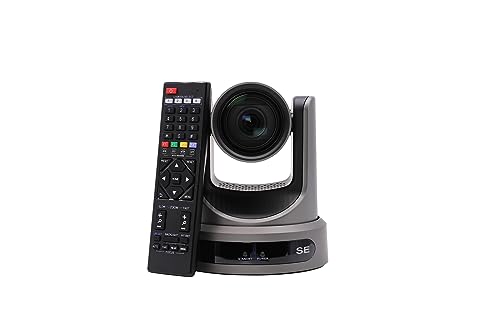
PTZOptics Move SE 20x 1080p Full HD PTZ Auto-Tracking Pan Tilt Zoom Camera
$1,281.55 Specs and sizingA 20x lens at 1080p60 with power over Ethernet and auto-tracking. It reaches the platform from the back of almost any room under about 70 feet deep, and 1080p is the resolution you should be streaming anyway.
Best for: The first camera in a church under 500 seats
Check price on Amazon
Cable Matters 10Gbps Snagless Shielded Cat 6A Ethernet Cable, 100ft
$29.99A 100 foot shielded Cat6a run at $29.99, which carries both the power and the video for a PoE camera. Buy it with the camera rather than discovering the gap on install day.
Best for: A single camera run from the rack to a wall or balcony mount
Check price on AmazonWho should not buy this tier: Rooms deeper than about 70 feet from the mounting position to the platform, where a 20x lens will not hold a tight shot.
Mid-size church, two cameras: $1,999 to $2,231 each
Two cameras, and the pairing that works is a wide and a tight. Put the 12x camera close in where it can hold the whole platform, and the 20x further back for the shot on whoever is speaking. Buying 4K sensors at this stage is not about streaming 4K, which you should not do: it is about cropping a 4K frame into a 1080p stream so that each camera effectively gives you two framings.

PTZOptics Move 4K 12X Optical Zoom Camera - Grey
$1,999.00 Specs and sizingA 12x lens is wide enough to hold the whole platform from a position close to it, which a 20x lens physically cannot do. NDI and PoE keep the install to one network cable.
Best for: A wide shot mounted close to the platform
Check price on Amazon
PTZOptics Move 4K 20x Auto-Tracking PTZ Camera
$2,231.00 Specs and sizingThe 4K auto-tracking camera at the zoom range most sanctuaries need, with NDI so it rides the network you already have rather than needing a new coaxial run.
Best for: The primary shot in a mid-size room
Check price on Amazon
Blackmagic Design ATEM Mini Pro HDMI Live Stream Switcher
$349.00 Specs and sizingFour HDMI inputs, a multiview so the operator sees every camera at once, and hardware streaming with no computer in the chain. Two cameras is the point at which a switcher stops being optional.
Best for: Cutting two or three cameras with a volunteer operator
Check price on AmazonWho should not buy this tier: A church with a single volunteer and no rota, where two cameras means one camera pointing at nothing.
Large room or multi-campus: $2,699 per camera
Large sanctuaries put the only available camera position a long way from the platform, and that is a lens problem with one answer. A 30x camera at 110 feet or more holds a tight shot that a 20x cannot reach, at the cost of magnifying every vibration in the mount, which is why the bracket at this level has to be fixed to structure. Expect to pair it with a wide camera, because a 30x lens at its wide end still will not hold the whole platform from that far back.

PTZOptics Move 4K 30x Auto-Tracking PTZ Camera
$2,699.00 Specs and sizingA 30x lens for a genuinely long throw, such as a tight shot of the pulpit from the back wall of a 150 foot room. NDI, PoE and auto-tracking as with the rest of the range.
Best for: Large sanctuaries where the only camera position is a long way out
Check price on Amazon PTZOptics Move 4K 20x Auto-Tracking PTZ Camera
$2,231.00 Specs and sizingThe 20x camera closer in to hold the wide shot the 30x cannot, which is how a large room actually gets covered rather than by buying two long lenses.
Best for: The wide angle half of a large room camera pair
Check price on Amazon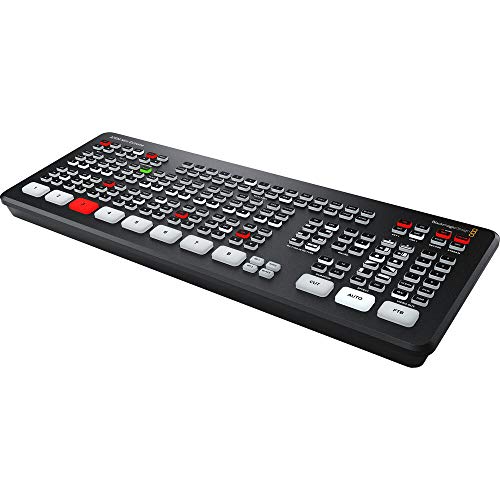
Blackmagic Design ATEM Mini Extreme HDMI Switcher
$1,249.00 Specs and sizingEight inputs, four chroma keyers and two media players, which covers a multi camera room with lower thirds and lyrics without a separate graphics computer.
Best for: Four or more cameras with a dedicated video volunteer
Check price on AmazonWho should not buy this tier: A church whose camera position is 50 feet from the platform. A 30x lens there is reach you will never use, it makes framing twitchier for the operator, and the extra money would be better spent on a second camera or on the stream audio chain.
The cameras compared
| Model | Price | Maximum resolution | Optical zoom | SDI output | NDI | Power over Ethernet |
|---|---|---|---|---|---|---|
| PTZOptics Move SE 20x 1080p Full HD PTZ Auto-Tracking Pan Tilt Zoom Camera | $1,281.55 | 1080p60 | 20x | Yes | No | Yes |
| PTZOptics Move 4K 12X Optical Zoom Camera - Grey | $1,999.00 | 2160p30 | 12x | Yes | Yes | Yes |
| PTZOptics Move 4K 20x Auto-Tracking PTZ Camera | $2,231.00 | 2160p30 | 20x | Yes | Yes | Yes |
| PTZOptics Move 4K 30x Auto-Tracking PTZ Camera | $2,699.00 | 2160p30 | 30x | Yes | Yes | Yes |
Auto-tracking, presets and what actually goes wrong
Auto-tracking is genuinely useful and frequently oversold. It follows a person moving across a platform and keeps them roughly centred, which covers the weeks when no volunteer is available and removes the worst failure of an unmanned camera, which is a preacher who walks out of frame and stays there. What it does badly is a platform with several people on it, because it has to choose, and it will sometimes choose the worship leader while the preacher is speaking. Treat it as a safety net rather than as an operator.
Presets are the more valuable feature and the one churches under use. Store a wide shot, a preaching shot and a music shot on each camera, and the operator becomes somebody pressing three buttons at sensible moments rather than somebody trying to frame live on a joystick. Set the presets in the actual service lighting, not in an empty lit room, and re-save them whenever the platform layout changes. The other recurring failure is exposure: a camera on auto will hunt every time a lighting scene changes, so lock exposure and white balance once the platform lighting is set. For the whole camera plan see how to position church livestream cameras, and for where cameras sit in a full system, the multi camera livestream system.
How we chose
We did not test these products in person and we never claim to. Picks are researched from manufacturer specification sheets and operator manuals, FCC rules where spectrum is involved, published standards, warranty terms, and the recurring themes in verified owner reviews. Every pick is matched to a real room size, seat count or input list rather than to a price bracket, and it is placed in the tier where its capability actually belongs. Where a product is wrong for most churches we say so on the page.
Sources
- PTZOptics published specifications for the Move SE 20x and Move 4K 12x, 20x and 30x cameras
- Blackmagic Design published specifications for the ATEM Mini range
- Published guidance on power over Ethernet class budgets and network video cabling practice
Frequently asked questions
How much zoom does a church PTZ camera need?
Measure the distance from the mounting position to the platform. Under 40 feet, a 12x lens is enough and holds the wide shot too. Between 40 and 70 feet, 20x is the standard choice. Past about 110 feet you need 30x for a tight shot, and you will need a second wider camera as well because a long lens cannot hold the whole platform from there.
What is the advantage of a PoE camera in a church?
One cable. Power over Ethernet carries both power and video on a single network run, so mounting a camera means one hole and one conduit rather than a data run plus an electrician adding an outlet fifteen feet above the floor. It also lets you power cycle a locked up camera from the switch instead of getting a lift out before a service.
Is NDI worth it for a church camera system?
It is, if the network is competent. NDI sends video over ordinary network cabling, so any point with a network socket becomes a camera position and adding a camera later does not mean pulling new coaxial cable. The requirement is a dedicated switch and proper Cat6a cabling. NDI sharing an unmanaged switch with guest Wi-Fi produces intermittent dropped frames nobody can reproduce.
Does auto-tracking actually work for a church service?
Well enough to be worth having, and not well enough to replace an operator. It keeps a person moving across a platform roughly centred, which solves the worst failure of an unmanned camera. It struggles when several people are on the platform, because it has to choose who to follow. Use it as the fallback for weeks with no volunteer, and use stored presets the rest of the time.
Where should a church mount a PTZ camera?
At roughly platform height or slightly above, on a side wall bracket or a balcony rail, with a clear sight line that nobody walks through. A camera at seated head height shoots the back of the congregation, and one high on a rear wall looks down at the tops of heads. Fix the bracket to structure, because a long lens magnifies every vibration in the mount.
Should a church buy 4K PTZ cameras?
Buy 4K capture if the budget allows, but do not stream it. A 4K sensor lets you crop into a 1080p stream without losing resolution, which gives each camera a second framing for free. Streaming 4K roughly triples the bitrate to around 20,000 kbps and demands 40 Mbps of upload headroom, for a resolution almost nobody in the congregation is watching on.
Researched, not professional advice. This page is compiled from published manufacturer specifications, operator manuals, FCC rules, published standards and owner-review consensus, not hands-on testing. Sound system design, rigging loudspeakers overhead, and any electrical work are jobs for a qualified professional: have flown loudspeakers and their attachment points signed off by a structural engineer or a certified rigger, and have all wiring done by a licensed electrician to your local code. Wireless microphone rules change, so confirm the current FCC position before buying. As an Amazon Associate we earn from qualifying purchases.