Livestream video
Best Livestream Cameras for Churches
Quick answer
Most churches should buy one PTZOptics Move SE 20x at $1,281.55 and spend the next $225 on an audio interface, not on a second camera. Audio is what viewers complain about, and a camera microphone hears the room rather than the mix. Stream at 1080p, not 4K.
Churches buy livestream cameras in the wrong order. The camera gets the budget and the attention, and then the stream goes out sounding like a phone recording from the back of the room, because the audio came from a microphone on the camera that heard the congregation, the air handling and a reverberant room rather than the mix the sound team built. Fix the audio first with an interface taking a feed from the console, which costs between $86.90 and $299.99 and is the single highest value purchase in this category. Then buy the camera. Work the bandwidth you actually have with the livestream bitrate calculator before choosing a resolution. Specifications below are researched from published manufacturer figures.
On this page
- Why a church should shoot 4K and stream 1080p
- What bitrate and upload speed a church service actually needs
- Small church, one camera: about $1,600 including the audio fix
- Mid-size church, two or three cameras: $2,000 to $2,600 per camera
- Large room, multi-campus or a real production: $1,949 to $2,699 per camera
- The cameras compared
- Camera position, and what usually goes wrong
Why a church should shoot 4K and stream 1080p
Streaming in 4K roughly triples the bitrate for a resolution that almost nobody in the congregation is watching on. A 1080p30 stream needs about 4,500 kbps and an upload connection with 9 Mbps of headroom. The same service at 2160p30 needs around 20,000 kbps and 40 Mbps of upload, which many church buildings simply do not have, and the viewers who cannot sustain it get buffering rather than detail. Meanwhile the majority of church livestream viewing happens on phones and tablets.
Shooting 4K is a different question and often worth it. A 4K sensor delivering a 1080p stream lets you crop in to a tighter shot without losing resolution, which effectively gives a fixed camera a second framing for free and rescues a wide shot where nobody was operating. So the rule is: capture at 4K where the budget allows, deliver 1080p, and use the extra pixels for framing rather than for the stream. Run your own numbers at the bitrate calculator.
What bitrate and upload speed a church service actually needs
This is the table to take to whoever manages the church internet connection, because the argument for 1080p is won on upload capacity rather than on aesthetics. The upload column is deliberately double the stream bitrate: a church connection is shared, and a stream with no headroom drops the moment somebody uploads a video file in the office.
A 1080p30 church stream needs about 4,500 kbps of video and an upload connection with at least 9 Mbps of headroom, while 4K triples that to roughly 20,000 kbps.
| Resolution | Video bitrate | Upload needed | Data per 90 min | What it suits |
|---|---|---|---|---|
| 720p30 | 3,000 kbps | 6 Mbps | 2.0 GB | A phone or a single fixed camera, and perfectly watchable |
| 1080p30 | 4,500 kbps | 9 Mbps | 3.0 GB | The sensible default for a church service |
| 1080p60 | 6,000 kbps | 12 Mbps | 4.1 GB | Worth it only if there is real motion to resolve |
| 2160p30 | 20,000 kbps | 40 Mbps | 13.5 GB | Triple the bitrate for a resolution almost nobody watches on |
Video bitrate figures are typical platform recommendations. Add roughly 128 to 160 kbps for stereo audio. The upload column is double the stream bitrate, which is the headroom a shared church connection needs so that one person opening a large file does not drop the stream. Data per service assumes 90 minutes of continuous streaming.
Small church, one camera: about $1,600 including the audio fix
One camera on a wide shot, audio taken from the console, streamed from a laptop. That is a complete livestream and it is better than most three camera setups running camera audio. Put the camera at the back on a balcony rail or a side wall at roughly platform height, frame the whole platform, and leave it. A static wide shot that is well exposed and correctly amplified looks like a church service. A shaky operated shot with room audio looks like a phone video.
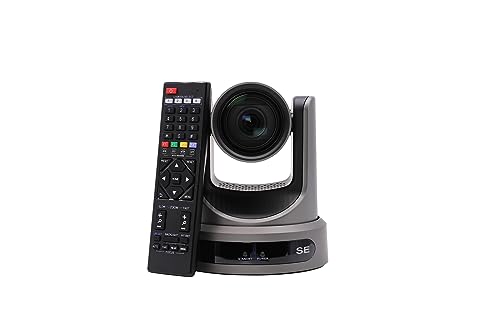
PTZOptics Move SE 20x 1080p Full HD PTZ Auto-Tracking Pan Tilt Zoom Camera
$1,281.55 Specs and sizingPower over Ethernet means one cable, which removes the hardest part of a first install. The 20x lens reaches the platform from the back of most sanctuaries and the camera outputs 1080p over SDI, HDMI, USB and IP.
Best for: The first and often the only camera in a church under 250 seats
Check price on Amazon
Behringer UMC202HD Audiophile 2x2, 24-Bit/192 kHz USB Audio Interface with Midas Mic Preamplifiers
$86.90Two channels of Midas preamp at $86.90, which takes a line feed from the console into the streaming computer. This $87 device improves the stream more than any camera upgrade at any price.
Best for: The cheapest way to stop streaming the camera microphone
Check price on Amazon
Elgato Cam Link 4K Capture Card for DSLR, Camcorder, Action Cam, USB-A Connector, USB 3.0 Hardware Interface, Black, Windows 10/11 and macOS
$89.99The capture device that reliably works. The unbranded HDMI dongles at a fifth of the price drop frames and lose audio sync mid-service, which is a problem you only discover in front of the congregation.
Best for: One camera into a computer running streaming software
Check price on AmazonWho should not buy this tier: Churches already running two or more cameras, where a hardware switcher removes the computer from the critical path.
Mid-size church, two or three cameras: $2,000 to $2,600 per camera
The second camera is what makes a stream feel like a service rather than like surveillance: a wide shot for the room and a tighter shot on whoever is speaking or leading. This is also where 4K capture starts to earn its money, because cropping a 4K wide shot into a 1080p stream gives you a third framing without a third camera. Cut sparingly. Two well chosen shots held for a long time read better than constant cutting.

PTZOptics Move 4K 12X Optical Zoom Camera - Grey
$1,999.00 Specs and sizingA 4K camera with a 12x lens, wide enough to hold the whole platform from a close mounting position where a longer lens physically cannot. NDI means it rides the existing network rather than needing a new coaxial run.
Best for: A wide shot from a position close to the platform
Check price on Amazon
PTZOptics Move 4K 20x Auto-Tracking PTZ Camera
$2,231.00 Specs and sizingThe 4K auto-tracking camera at the zoom range most sanctuaries need. Shoot 4K, deliver 1080p, and crop in for a tighter framing without losing resolution.
Best for: The primary camera in a mid-size to large room with a network already in place
Check price on Amazon
Focusrite Scarlett 4i4 4th Gen USB-C Audio Interface
$299.99 Specs and sizingFour in and four out, which lets the stream take its own mix from a console aux or matrix rather than a copy of the house mix. The house mix is built for a room with acoustic sound already in it and usually translates badly.
Best for: A stream that needs its own balance rather than a copy of the room
Check price on AmazonWho should not buy this tier: A church with one volunteer and no rota, where a second camera nobody operates just adds a shot to get wrong.
Large room, multi-campus or a real production: $1,949 to $2,699 per camera
At this level the church is producing content rather than recording a service, and the shot list includes things a pan tilt zoom camera cannot do well: a shallow depth of field close shot, a camera on a shoulder in the congregation, or a long reach from the back wall of a room with 150 feet of throw. That is what mixing camera types is for. It also means a dedicated video volunteer or two, because none of this runs itself.

PTZOptics Move 4K 30x Auto-Tracking PTZ Camera
$2,699.00 Specs and sizingA 30x lens, which is what a genuinely long throw needs: a tight shot of the pulpit from the back wall of a large sanctuary where a 20x lens runs out of reach.
Best for: Large sanctuaries where the camera position is a long way from the platform
Check price on Amazon
SONY Cinema Line FX30 Super 35 Camera
$2,098.00A Super 35 cinema camera for the one shot that should look like film rather than like a security camera, usually the locked off close shot of the person speaking.
Best for: A hero camera alongside pan tilt zoom cameras, and separate video production
Check price on Amazon
Canon XA60 Professional UHD 4K Camcorder Lens Kit
$1,949.00A traditional camcorder with a 20x lens, XLR audio inputs and UVC streaming over USB, so it appears to a computer as a webcam with no capture card at all. It also goes off site for outreach video, which a ceiling mounted camera cannot.
Best for: A manned camera operator position and video work away from the building
Check price on AmazonWho should not buy this tier: A church with one camera operator and a 1080p stream. A cinema camera in a fixed position streaming at 1080p looks almost identical to a $1,281 pan tilt zoom camera to a viewer on a phone, and the money would buy a full stream audio chain and a second PTZ camera with change left over.
The cameras compared
| Model | Price | Maximum resolution | Optical zoom | SDI output | NDI | Power over Ethernet | Streaming output |
|---|---|---|---|---|---|---|---|
| PTZOptics Move SE 20x 1080p Full HD PTZ Auto-Tracking Pan Tilt Zoom Camera | $1,281.55 | 1080p60 | 20x | Yes | No | Yes | SDI, HDMI, USB and IP |
| PTZOptics Move 4K 12X Optical Zoom Camera - Grey | $1,999.00 | 2160p30 | 12x | Yes | Yes | Yes | - |
| PTZOptics Move 4K 20x Auto-Tracking PTZ Camera | $2,231.00 | 2160p30 | 20x | Yes | Yes | Yes | - |
| PTZOptics Move 4K 30x Auto-Tracking PTZ Camera | $2,699.00 | 2160p30 | 30x | Yes | Yes | Yes | - |
| Canon XA60 Professional UHD 4K Camcorder Lens Kit | $1,949.00 | 2160p30 | 20x | - | - | - | UVC over USB and HDMI |
| SONY Cinema Line FX30 Super 35 Camera | $2,098.00 | 2160p60 | - | - | - | - | HDMI and USB |
Camera position, and what usually goes wrong
Height first. A camera at seated head height shoots the back of the congregation, and a camera high on a rear wall looks down on the tops of heads. The usable position is roughly platform height, or slightly above, from a balcony rail or a side wall bracket. Second, light. A camera pointed at a platform lit only by projector spill and daylight through a window behind it will expose for the window and silhouette the preacher. Fix the platform lighting before blaming the camera.
Third, the network. Cameras using NDI put real traffic on the church network, and a single unmanaged switch shared with the guest Wi-Fi is where intermittent dropped frames come from. Budget for a dedicated switch and a proper Cat6a run. Fourth, nobody to run it, which is the most common failure of all: a three camera system with a rota of one becomes a one camera system with two cameras pointing at nothing. Start with what the volunteer team can sustain. For positions and framing see how to position church livestream cameras, for the whole chain how to livestream a church service, and for the network question NDI versus SDI.
How we chose
We did not test these products in person and we never claim to. Picks are researched from manufacturer specification sheets and operator manuals, FCC rules where spectrum is involved, published standards, warranty terms, and the recurring themes in verified owner reviews. Every pick is matched to a real room size, seat count or input list rather than to a price bracket, and it is placed in the tier where its capability actually belongs. Where a product is wrong for most churches we say so on the page.
Sources
- PTZOptics published specifications for the Move SE and Move 4K camera families
- Sony published specifications for the Cinema Line FX30 and Canon published specifications for the XA60
- Platform recommended bitrate ranges for 720p, 1080p and 2160p live streams
Frequently asked questions
What camera should a church use for livestreaming?
For most churches, one pan tilt zoom camera with power over Ethernet, such as the PTZOptics Move SE 20x at $1,281.55. It carries power and video on one cable, reaches the platform from the back of a typical sanctuary, and can be operated remotely or left on auto-tracking. Spend the next money on stream audio rather than on a second camera.
Should a church livestream in 4K?
No. Streaming 4K roughly triples the bitrate, from about 4,500 kbps at 1080p30 to around 20,000 kbps, and demands 40 Mbps of upload headroom that most church buildings do not have. Most viewers are watching on phones. Shoot 4K if the camera offers it, then deliver 1080p and use the extra pixels to crop in for a tighter framing.
Why does our church livestream sound bad?
Because the audio is almost certainly coming from a microphone on the camera, which hears the whole room: reverberation, the congregation, air handling and stage monitors all at once. Take a line level feed from the mixing console into an audio interface or into the line input on the switcher instead. An interface costs between $86.90 and $299.99 and is the highest value purchase in church livestreaming.
How much upload speed does a church livestream need?
At least double the stream bitrate, so about 9 Mbps for a 1080p30 stream and 12 Mbps for 1080p60. The doubling is headroom, because a church connection is shared and a stream running at the limit drops the moment somebody in the office uploads a file. Test the upload speed at the time of day the service actually happens, not on a quiet weekday.
How many cameras does a church livestream need?
One is a complete livestream if the audio is right. A second camera adds a tighter shot of whoever is speaking and makes the stream feel like a service rather than surveillance. Beyond three, the limit is volunteers rather than equipment, and a shot nobody is operating is worse than no shot at all. Match the camera count to the rota you can actually fill.
Is a PTZ camera better than a camcorder for a church?
For a fixed installation, usually yes. A pan tilt zoom camera mounts out of the way, runs on one Ethernet cable and can be operated by the same person running the switcher. A camcorder wins when you need a manned shot with a person judging framing live, XLR audio inputs on the camera itself, or a camera that goes off site for other church video work.
Researched, not professional advice. This page is compiled from published manufacturer specifications, operator manuals, FCC rules, published standards and owner-review consensus, not hands-on testing. Sound system design, rigging loudspeakers overhead, and any electrical work are jobs for a qualified professional: have flown loudspeakers and their attachment points signed off by a structural engineer or a certified rigger, and have all wiring done by a licensed electrician to your local code. Wireless microphone rules change, so confirm the current FCC position before buying. As an Amazon Associate we earn from qualifying purchases.